A Mac storage cleaner that asks before anything moves
DiskFox finds space you can safely reclaim, such as caches, logs, old downloads and developer leftovers. It explains what each item is, and moves only what you approve to the Trash, where you can put it back.
$6.99 one-time · 14-day free trial, no card needed · macOS 14 or later


How cleanup works
DiskFox's Clean Up page lists what you can reclaim, with each item explained:
- Ready to clean up: items DiskFox can move to the Trash now, with how much space each one frees.
- Close an app first: items whose app is open. DiskFox can ask the app to quit normally; it never force-quits.
- More options: things that need more thought, such as iPhone backups or Xcode archives you may want to keep.
Nothing moves until you review it. The Review Cleanup sheet shows how much space each item frees, where it's going, and anything you should know, such as "May need to download again" or "Restart required". Confirming is the only way anything moves.
Almost everything goes to the Trash, where you can put it back. The exceptions are Xcode simulator runtimes and unavailable simulator devices, which Xcode's own tools delete permanently. DiskFox asks you to confirm those separately.
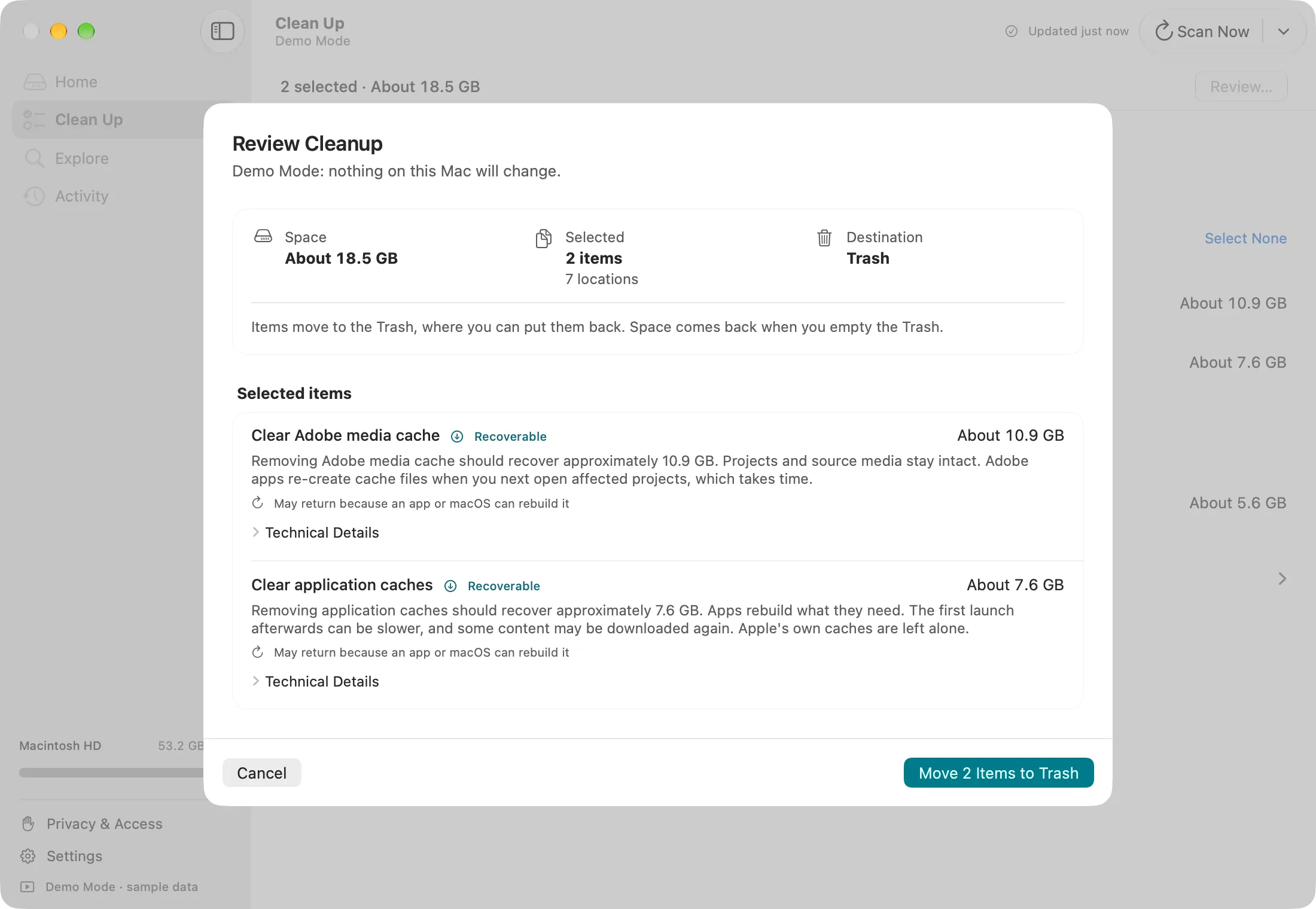
Review Cleanup in Demo Mode, with sample data.
What it can clean
- App caches: browsers (Safari, Chrome, Edge, Brave, Firefox, Arc), Spotify, Adobe media cache, and Slack, Discord and VS Code.
- macOS leftovers: application logs, crash and diagnostic reports, and old temporary files.
- Downloads you've forgotten: files of 50 MB or more untouched for 90 days. This needs Downloads access.
- Apple devices: iPhone and iPad software downloads, Mail attachment copies and, after review, old iPhone and iPad backups.
- Developer leftovers:
- Xcode DerivedData, archives (after review), device support files and simulator caches.
- Package caches for Swift Package Manager, CocoaPods, Homebrew, npm, Yarn, pip, Poetry, Bun, Gradle, Go and Cargo.
- Android emulator and SDK system images, Hugging Face models (after review) and JetBrains caches.
- Possibly abandoned app data: folders left behind by apps you've already deleted.
What it won't touch
Some things look big but shouldn't be deleted by hand. DiskFox measures them, explains them, and leaves them alone:
- Downloaded macOS updates, the swap file and sleep image, and Siri, speech and translation assets.
- Apple Intelligence models. DiskFox shows their size, and only offers a step-by-step guide if you choose to remove them through macOS Recovery.
- Time Machine local snapshots, which DiskFox counts, and purgeable space, which macOS frees itself when it needs room. DiskFox explains these but doesn't remove them.
There's no "clean everything" button, and DiskFox never removes anything automatically.
After cleanup
- A verification scan measures how much space you really got back.
- Delete from Trash Now… permanently removes only the items DiskFox just moved, if you want the space straight away. The rest of your Trash is left alone.
- Notify Me If It Comes Back watches anything that tends to regrow, such as caches. See why Mac storage keeps filling up.
- Cleanup History keeps a record of every cleanup, with Put Back for items still in the Trash.
Uninstalling apps
In Explore › Applications, Review Uninstall… moves an app and the support folders you choose to the Trash. Those are the folders named exactly after the app. DiskFox is upfront that files an app created elsewhere may remain. Apps that install system extensions, or that come with their own uninstaller, get pointed to the right one instead.
Want to see what's using space before cleaning? See the Mac storage analyzer page.
Questions people ask
Is it safe to clean caches?
Caches are copies that apps can rebuild, so removing them is usually safe, but they grow back with use. DiskFox explains each item and moves it to the Trash, so you can put it back.
Does DiskFox delete files permanently?
Only if you ask. Cleanup moves items to the Trash. The exceptions are Xcode simulator runtimes and unavailable simulators, which Xcode's own tools delete after you confirm separately.
Does it clean memory or speed up my Mac?
No. DiskFox only deals with storage. It has no RAM cleaning, malware scanning or "speed up" tools.
Do I need Full Disk Access?
It's optional. With it, DiskFox can also measure and clean things macOS protects, such as Mail attachment copies, Safari's cache and old iPhone backups.
Will the space come back?
Some of it, such as caches, often does as you use your apps. DiskFox can notify you if it returns, and shows what grew in What Changed.