How much space Apple Intelligence takes on macOS 27
Short answer. Apple says Apple Intelligence on macOS 27 needs up to 14 GB on newer Macs. On a MacBook Air M4 with 16 GB of memory, Storage settings shows 22.19 GB, almost a tenth of a 256 GB drive. macOS 27 has no switch that gives the space back, and Apple offers no way to remove the models. So the safe move is to check how much yours takes and free space elsewhere.
Apple's figure and what Macs actually show
Apple says Apple Intelligence needs up to 14 GB on Macs with an M3 chip or later and at least 12 GB of memory, and up to 8 GB on other supported Macs. The figure in Storage settings is often higher:
| Mac | Storage settings shows |
|---|---|
| MacBook Air M4, 16 GB memory (ours) | 22.19 GB |
| MacBook Air M3 (Ars Technica, tested before release) | 22.42 GB |
| Mac mini M4 Pro (MacRumors) | 20.67 GB |
| MacBook Air M1 and MacBook Neo (Ars Technica) | about 14 GB each |
| Two Reddit users (reported by MacRumors) | 24.35 GB and 30.16 GB |
That figure isn't all space you'd get back, though. When AppleInsider removed the models, the Apple Intelligence line dropped by 24.5 GB, but free space grew by only about 14 GB.
How to check it on your Mac
- Choose Apple menu > System Settings, then General > Storage.
- Wait for the bar at the top to finish loading.
- Scroll down to macOS and click the (i) next to it.
- The window that opens shows Apple Intelligence and its size.
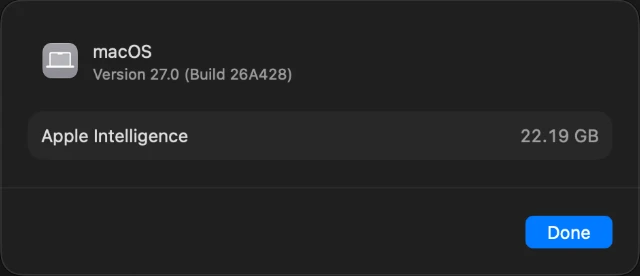
Storage settings on our MacBook Air M4 running macOS 27.0, 6 October 2026.
Can you turn it off or remove it?
Not in any way Apple supports.
- There's no single off switch in macOS 27. Apple's guide lists separate switches for Siri and individual features, plus Screen Time limits. Advice to turn it off under System Settings > Apple Intelligence & Siri is for macOS 26 Tahoe; that switch is gone.
- The switches don't give the space back. Apple doesn't say they delete the downloaded models, and reviewers found they don't free the space.
- Apple offers no button to remove the models. The ways people remove them, such as third-party tools or deleting system folders by hand, are unofficial. The tools change system settings, turn off features such as Writing Tools and Image Playground, and may stop working after a future macOS update. MacRumors and 9to5Mac both advise caution. If you try one anyway, back up first.
- They may come back. Some people report the models returning after the macOS 27.0.1 update.
DiskFox doesn't remove the models either. It shows how much they take, can move Apple Intelligence's own caches to the Trash after you review them, and tells you if the models come back after an update.
What you can safely do instead
- Use Apple's own suggestions. At the top of Storage settings, the recommendations offer to store files in iCloud, optimise storage and empty the Trash automatically. The (i) buttons next to each category let you delete files you no longer need. Apple explains each one.
- Give a big update a day or two. Used space can jump for a day or so after a major macOS upgrade and then fall back. On one test Mac it peaked about 150 GB higher and settled about 30 GB higher, Eclectic Light found.
- Let macOS tidy up. When space runs low, macOS clears safe caches, logs, interrupted downloads and staged updates by itself.
- Clear what you control. Old iPhone and iPad backups, Xcode simulators, downloads and large videos are often bigger than Apple Intelligence, and you decide what goes.
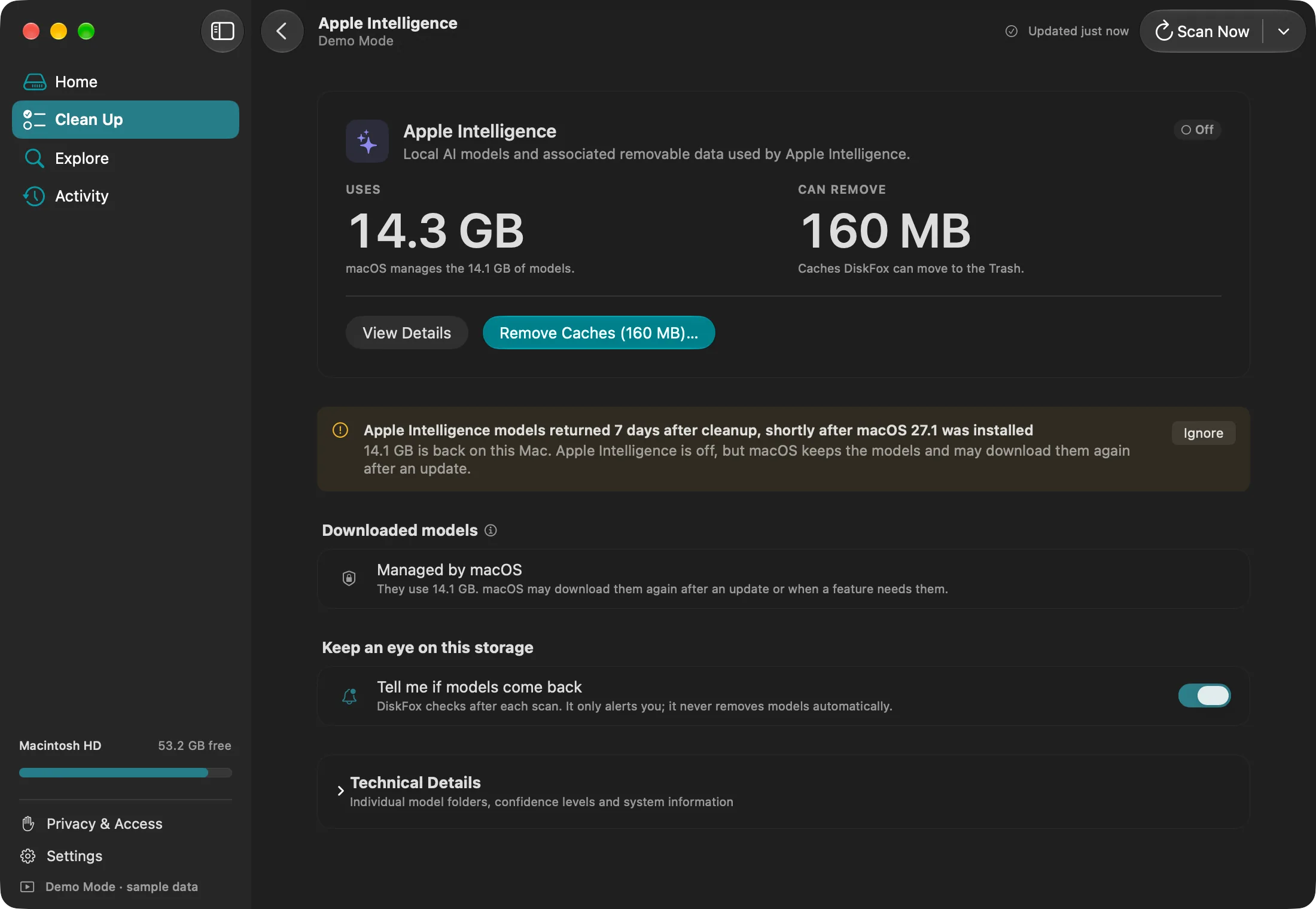
DiskFox's Apple Intelligence page, with Demo Mode sample data. It shows what the models use, which caches are safe to remove, and warns you when the models come back.
Sources
- Apple: Apple Intelligence requirements (14 September 2026), Turn off or restrict access to Apple Intelligence, Optimise storage space and Free up storage space on Mac
- Ars Technica, 16 September 2026: macOS 27 Golden Gate review
- Eclectic Light, 18 September 2026: How did Golden Gate affect free disk space?
- MacRumors, 23 September 2026: Apple Intelligence takes up to 30 GB on some Macs; 5 October 2026: removal tool
- AppleInsider, 24 September 2026: How to remove Apple Intelligence models
- 9to5Mac, 5 October 2026: Think twice before using it
- Our own measurement: MacBook Air M4, 16 GB memory, 256 GB, macOS 27.0 (build 26A428), 6 October 2026.